Excel 2007’s Print Titles command enables you
to print particular row and column headings on each page of the report. Print
titles are important in multipage reports where the columns and rows of related
data spill over to other pages that no longer show the row and column headings.
Don’t confuse print titles with the header of
a report. Even though both are printed on each page, header information prints
in the top margin of the report; print titles always appear in the body of the
report — at the top, in the case of rows used as print titles, and on the left,
in the case of columns.
1
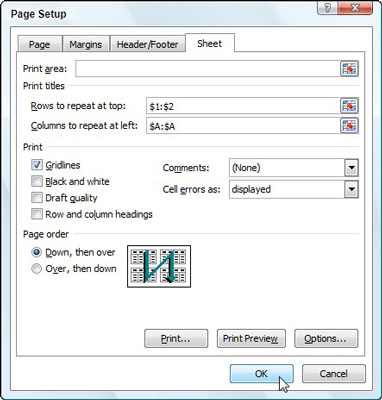
Click the Print Titles button
on the Ribbon’s Page Layout tab.
The Page Setup dialog box appears with the Sheet tab selected.
2
To designate worksheet
rows as print titles, select the Rows to Repeat at Top text box and then drag
through the row number(s) (in the worksheet frame) with data you want to appear
at the top of each page.
If necessary, reduce the Page Setup dialog box to just the Rows
to Repeat at Top text box by clicking the text box’s Collapse/Expand button.
3
To designate worksheet
columns as print titles, select the Columns to Repeat at Left text box and then
drag through the column letter(s) (in the worksheet frame) with the data you
want to appear at the left edge of each page.
If necessary, reduce the Page Setup dialog box to just the
Columns to Repeat at Left text box by clicking its Collapse/Expand button.
4
Click OK.
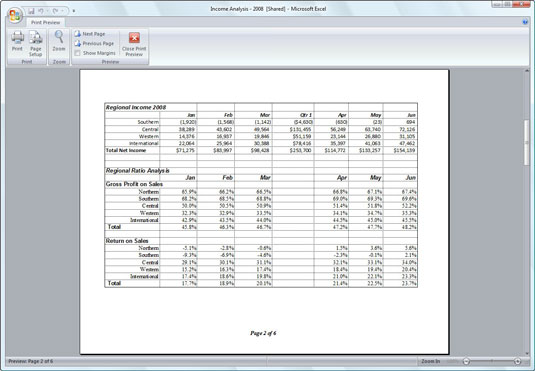
You can preview the worksheet to determine if the print titles
are set up correctly.
To clear print titles from a report if you no longer need them,
open the Sheet tab of the Page Setup dialog box and then delete the row and
column ranges from the Rows to Repeat at Top and the Columns to Repeat at Left
text boxes before you click OK.